1. Export an EDL marker file from DaVinci Resolve
- Select the sequence in your media tab.
- Make the right click on the sequence timeline in your media tab and it will open the popup.
- Navigate to: "Timeline > Export > Timeline Markers to EDL"
2. Use the "Märgistusmuundur" to convert the EDL marker file into a CSV file
Open the free Märgistusmuundur, select "DaVinci Resolve > Sequence (.edl)" and set "convert" to "CSV for Google Sheets". Generate and download the file. Kui teil on faili teisendamisega probleeme, võite pöörduda tasuta toe poole.
3. Import the CSV file into Google Sheets
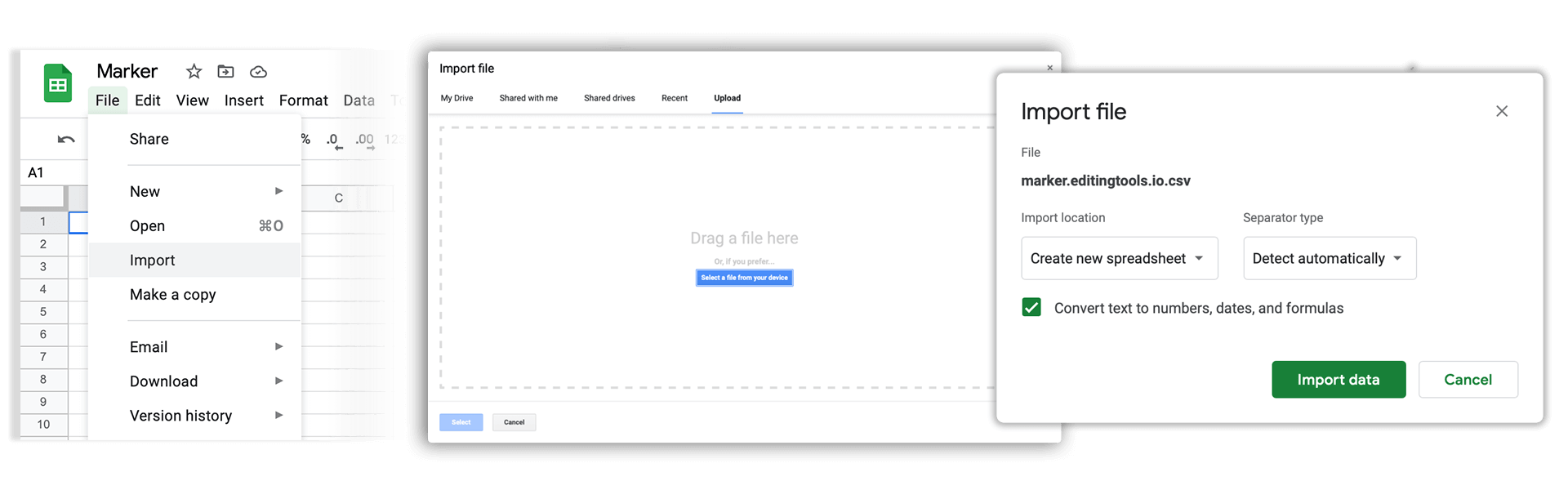
Open Google Sheets and go to "File -> Import". Upload the generated CSV file and press "Import Data" to generate the Sheet with all markers.
🚀 Valmis
Selleks korraks kõik! Kui see õpetus oli teile kasulik, jagage seda, et meid toetada. Kui teil on ettepanekuid, kuidas töövoogu paremaks muuta, andke meile teada!