1. Export a TXT marker file from Avid Media Composer
To export timeline markers, go to: "Tools -> Marker". Right Click on "Export Markers as Text".
2. Use the "Märgistusmuundur" to convert the TXT marker file into a CSV file
Open the free Märgistusmuundur, select "Avid Media Composer > Marker Text (.txt)" and set "convert" to "CSV for Google Sheets". Generate and download the file. Kui teil on faili teisendamisega probleeme, võite pöörduda tasuta toe poole.
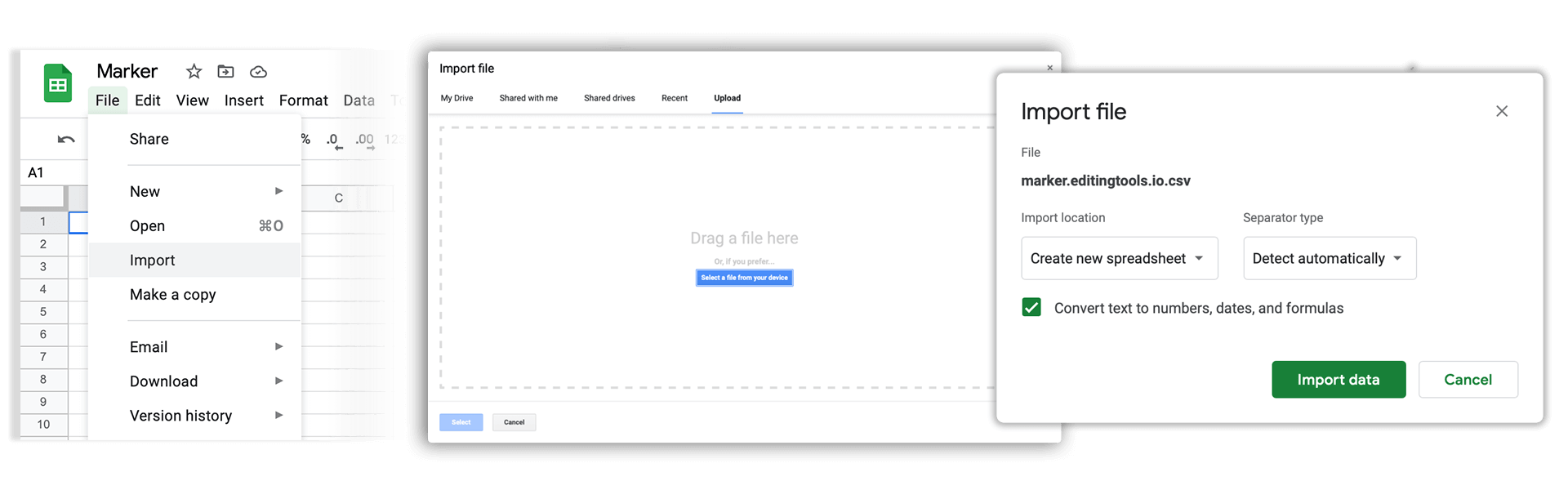
3. Import the CSV file into Google Sheets
Open Google Sheets and go to "File -> Import". Upload the generated CSV file and press "Import Data" to generate the Sheet with all markers.
🚀 Valmis
Selleks korraks kõik! Kui see õpetus oli teile kasulik, jagage seda, et meid toetada. Kui teil on ettepanekuid, kuidas töövoogu paremaks muuta, andke meile teada!